
As a full time Rver who moves from place to place often, trip planning is a task that I do very often. Having an RV specific trip planning tool is essential to make sure that I steer clear of low bridges, restricted tunnels, and restricted roadways (I.e. parkways in New York). For me, RV Life/ Trip Wizard is my go-to for planning my routes. Not only for planning the route, but also as my GPS on travel day.
Why I chose RV Life
Trip Wizard (part of RV Life) is the tool that I use to plan my route before travel days. When I plan routes it’s usually over the course of a week or more. For example, if I’m starting in the north and headed south for the winter over the course of several weeks, I’ll plan those several weeks in Trip Wizard. Basically, I stop my plan at the destination I’ll be at for multiple weeks.
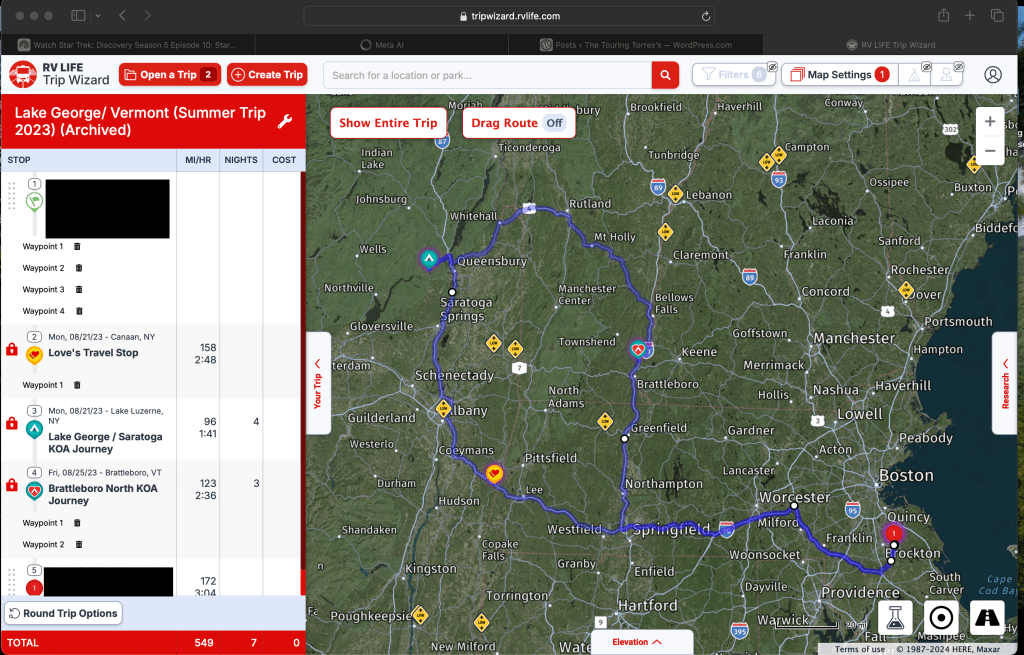
When I enter my starting location and ending location, trip wizard will highlight the route. I can then look up campgrounds, gas stations, rest stops, Walmart’s, Cracker Barrels, etc. along the route to help me plan my overnights or multi night stays on my way to my final stop. In addition to that, RV Life is a great resource for campground reviews. As I’m looking for campgrounds, I can see reviews, pictures, internet access, etc. all from RVers who have stayed at that campground, with the most recent stays being first.
My favorite part about RV Life and Trip Wizard, is the GPS function in the RV Life app. It will sync my planned trips to the app so when I start the GPS, it knows what route I’ve planned and asks if I want to follow that exact route. Also, let’s say I didn’t plan a route, but I’m hooked up and ready to go, I can tell the GPS where I’m headed and because it knows my rigs dimensions (height, weight, and propane on board) it will give me a safe route without any planning.
This is also a great feature if there are detours on your route that you didn’t know about beforehand. It happens often so having the GPS reroute, safely, is clutch. Here in the northeast, low clearances are everywhere, so I need a reliable GPS that’s not going to send my down a road with a bridge that is only 9 feet high when my rig is 11 feet high.
Trip Wizard also lets you customize the route it suggests. For example, if a campgrounds website tells you to take a certain route but trip wizard suggests something different, you can move the route to follow the campgrounds directions. It’ll sync that way to the GPS so you don’t have to worry about remembering the directions from the website. I also find this helpful when the GPS wants me to go through a dense area but there is an alternate way, albeit a little longer, that avoids the dense area. That’s a personal preference so it’s nice that I can make that change and the GPS will stick to my changes.
The RV Life app also works well with Apple CarPlay. It is also compatible with Android Auto but as an Apple user, I can’t speak to how it works. On Apple CarPlay it works very well and is easy to use. I can either start my navigation process on the phone first or directly on my vehicles infotainment system. If we need to make an additional stop, my copilot (my wife) can look for rest stops on the CarPlay screen while we’re driving.
Lastly, I can download all the maps I need on my route so they can be used offline. This means, even if I’m travelling through a dead zone with no service, my GPS will keep me on my safe route. As I’m sure you know, cell phone service isn’t always reliable especially in rural spots.
Why you should not use Google Maps
Let me first start by saying, I love Google Maps. It is my go-to navigation when I’m not hooked up to the camper. If I need to know how long it’ll take to get from point A to point B, I fire up Google Maps.
However, I would never, ever rely on Google Maps when I’m towing. There is no way of customizing Google Maps so that it knows to avoid low clearances or restricted roadways. Google Maps will choose a route that is the fastest and usually the least number of miles (part of its energy efficiency settings). This means it’ll route you on any street that it can see regardless of bridges, tunnel restrictions, tight turns/ U turns, weight restrictions, etc.
I do, however, use Google Maps to see satellite images of the route RV Life chose for me. I’ll also use the street maps to see things like gas stations to make sure there is enough room for me and the rig to navigate in and out of (gas truck problems). In fact, trip wizard has a street view feature, but it brings you to Google Maps. So, Google maps can be helpful, but do not rely on it to bring you on an RV safe route.
Alternatives to RV Life
When I was doing my research on what RV GPS to purchase, there were several options. I chose RV Life because I already relied on the campground reviews, so I was on the website already any way. I also like that the RV Life GPS was an app and not a physical GPS unit and it worked with Apple CarPlay. It also came with Trip Wizard for my trip planning tool, and it would sync automatically to the GPS on the app.
Another app-based option that I found was CoPilot. Just like RV Life, you enter your rigs dimensions, and it will provide you with a safe route. After reading about people’s experiences in different forums, I could see that most weren’t pleased, so I decided not to give it a try.
Trucker’s GPS apps were another option people suggested. I did not go with one of these because there are places my rig can go that truckers can’t because of how tall they are but mostly because how heavy they are. There are no RV’s that are even close to the 40 tons that trucks weigh when fully loaded. I’ve also read that a truckers GPS app will avoid tight, right hand turns when possible. Since I am shorter than most tractor trailers, I do not need this feature as much. In addition, I would still want/ need a trip planning tool.
The last option I gave thought to was a Garmin RV GPS unit. I love Garmin products and know that they are very reliable. They are the pioneers in GPS and have been at the forefront for many years. However, it meant having another screen on my dash/ windshield. My dash is already a little cluttered with my TPMS, Rear observation camera, my phone, and GoPro. Also, again, I would need to purchase a trip planning tool and then export my route to the Garmin.
So, RV Life won, and I have been very happy with it. There are some features that I would love to see added in the future. Real time traffic being one of them but overall, I know I can rely on it to navigate me on a route that is safe for my rig. RV Life Trip Wizard and GPS does require a subscription of $19.99/ month or $65/ year. As full timers, I chose the yearly plan since I need it for more than just a few months out of the year. It also comes with a 7-day free trial, so you can try it out before your next trip and see if it’s worth it to you.
Side note: Roadtrippers is another web-based app that has trip planning and an RV safe GPS. You’ll need to subscribe to their premium tier ($59.99/year) to have access to the GPS. I did not go with Roadtrippers as I made my decision a few years back and at the time it was inferior to RV Life. However, looking at the features, it looks as if they have the same if not a few more features than RV Life. Perhaps in the future I will check it out and compare them.
I hope you all enjoyed this. Please feel free to leave a comment below on your experience or if you use a different method, please share that as well.
God bless and stay safe.


 The Touring Torres’s
Leave a comment